A return can be physically complete before the money moves. It can also be financially complete while the item is still sitting in a quarantine bin. Neither condition tells you whether the order has recorded the right quantity. If all three systems write back to one field called return status, the last update wins and support has to reconstruct what actually happened.
Design the return around three records that reconcile independently: the refund, the inventory movement and the order-line adjustment. The customer can still see one clear summary. That summary should be derived from those records, not used to replace them.
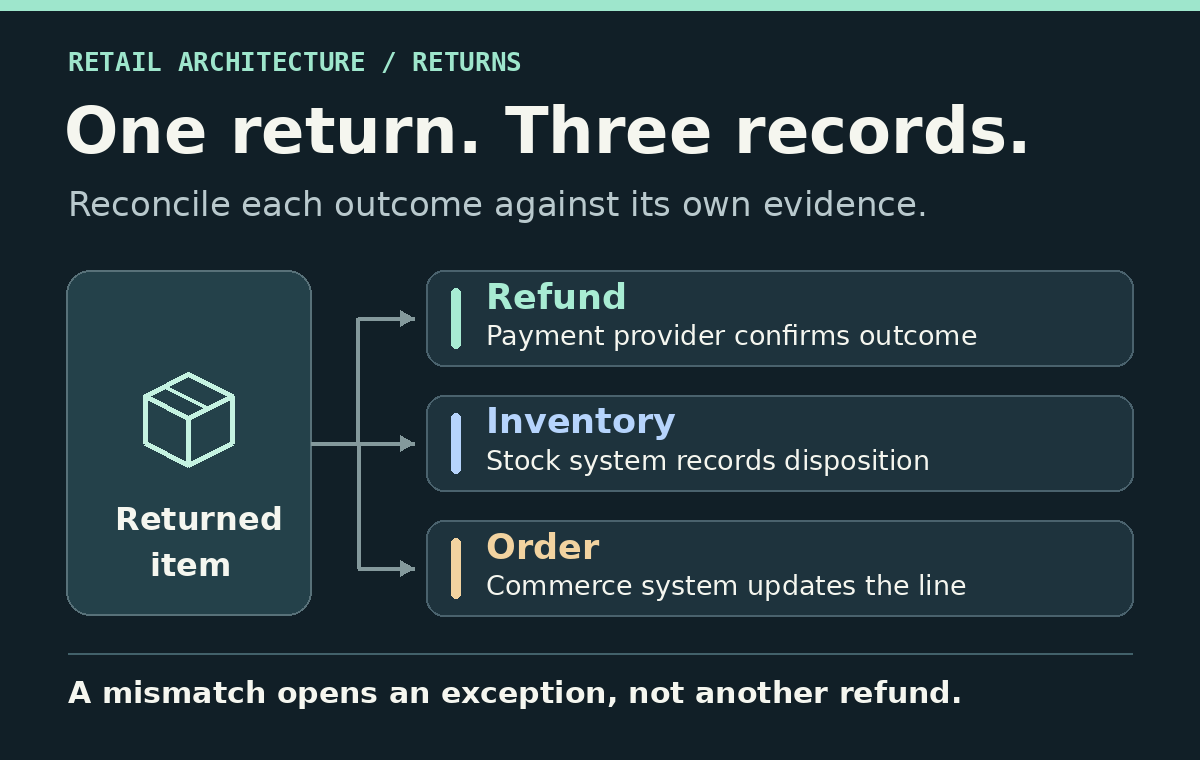
One return, three clocks
Consider a hypothetical online order for three identical lamps. The customer returns two through a store. The associate accepts both, but inspection finds only one is fit to sell. The order management system records two returned against the original order line; the third lamp remains sold. The store records one sellable unit and one damaged unit in quarantine. The payments service requests a CAD $120 refund, the approved amount for those two units after the original promotion, including the relevant tax.
The gateway request times out. Now support needs to know what is safe to say and do. The store has accepted the items. The order accurately records a partial return. The refund outcome is unknown, not failed. None of those truths needs to wait for the others.
Define what counts as evidence
| Record | Match against | What to do when it disagrees |
|---|---|---|
| Refund | Approved amount in minor units, currency and original tender or charge, matched to the processor’s refund record. Finance can then reconcile the processor balance movement separately. | Payments operations investigates an unknown outcome or amount mismatch. An order event cannot prove money moved. |
| Inventory | Receipt and disposition transactions by return line, item, quantity and location. In this case, one goes to sellable stock and one to quarantine. | Store or warehouse operations investigates an unposted or misrouted movement. A refund cannot make a damaged item sellable. |
| Order | The original fulfillment line and the quantity accepted under this return. Across returns, accepted quantities must stay within the eligible fulfilled quantity. | Order operations fixes a missed projection or flags a conflicting return. A correction here must not replay the refund or restock. |
For this return the daily comparison should read: 2 accepted on the order line; 2 physically accounted for across dispositions, of which only 1 is sellable; CAD $120 approved, with the processor result not yet known. Do not compare two different clocks as if they share a cutoff. Compare snapshots as of a recorded time and allow a defined processing window. If the order still shows only 1 accepted after that window, route a one-unit order discrepancy. If the processor later shows two successful CAD $120 refunds, route a money discrepancy, not a stock correction.
Make the return ID and return-line IDs stable. Each downstream operation also needs its own identity. A refund instruction may be one of several for a split-tender order; an inventory disposition may break one return line into separate transactions. Linking those operation IDs to the return is more useful than passing around an order number that several different actions share.
Reconcile the refund against the approved allocation, not the current shelf price. Store the allocation of the original promotion, tax and any applicable shipping or fees under the retailer’s policy. If the customer returns the third lamp later, compute that return against the remaining eligible quantity and financial balance. Keep split tenders separate until each has reconciled; equal totals can hide a refund against the wrong tender.
It is worth checking which distinctions the actual platform already exposes. Shopify’s ReturnLineItem reference, for example, links a return line to the original fulfillment line and reports processed and refunded quantities separately. Its RefundLineItem reference exposes restocking type and location. Those are useful inputs for the integration; their presence does not establish that a separate warehouse or payment provider has recorded the corresponding action.
Do not let a timeout create a second refund
Before calling the processor, persist the refund instruction and its idempotency key. If the response is lost, leave the instruction unknown. Look up the processor’s refund by its reference if you have it. Otherwise, use the provider’s supported recovery path, such as replaying the same request with the same key inside its documented retention rules. Do not create a fresh instruction just to get a clean response. A new attempt should follow evidence that the earlier one is terminal and did not deliver the intended refund, plus whatever authorization the retailer requires.
Stripe’s refund object distinguishes a pending refund, which the provider knows about, from a failed refund. When your call times out and you have no provider result, unknown is your own system’s state, not Stripe’s. Stripe’s API v1 idempotency documentation also says keys may be pruned once they are at least 24 hours old. An internal record that says “retry” does not extend that window.
Use verified webhooks to update the payment record quickly and a reconciliation job to detect missing updates or resolve old unknowns. Stripe’s webhook documentation warns that deliveries can be duplicated and arrive out of order. Deduplicate event deliveries and, if the sequence is ambiguous, retrieve the current provider record rather than overwriting a newer state with an old message. Neither webhook handling nor a refund retry should touch the stock ledger.
Before you call the design done
- Test two partial returns against one line. Use distinct return IDs and check the eligible quantity across both. Replaying a receipt must not add another unit to stock.
- Lose the refund response after acceptance. Confirm the retry path can recover the same operation and never silently sends a second refund. Test a delayed callback after the reconciliation job has already updated the record.
- Deliberately miss an order update. Confirm operations can repair the order projection without refunding or restocking again.
- Give exceptions an owner and an age. Separate expected processing delays from overdue unknowns. Show the return and operation IDs, the last confirmed evidence, and the next allowed action.
For the customer in this example, “Two items accepted; refund confirmation pending” is enough. For operations, the same return should show precisely which actions are confirmed, which are unresolved and what someone can safely do next. If that detail cannot survive a timeout, a duplicate message or a late correction, the integration is not ready just because the happy path says “returned.”
Join the discussion
You must be logged in to post a comment.