Receiving Labels · free sample
Inspect the sample before you buy.
Open a ready-made PDF containing 12 labels for a fictional delivery. Check the text, barcode layout and sheet size before deciding whether the full utility fits your receiving workflow.
Inspect the PDF without signing up or paying.
Letter sheet
30 label positions
2⅝ × 1 inch labels
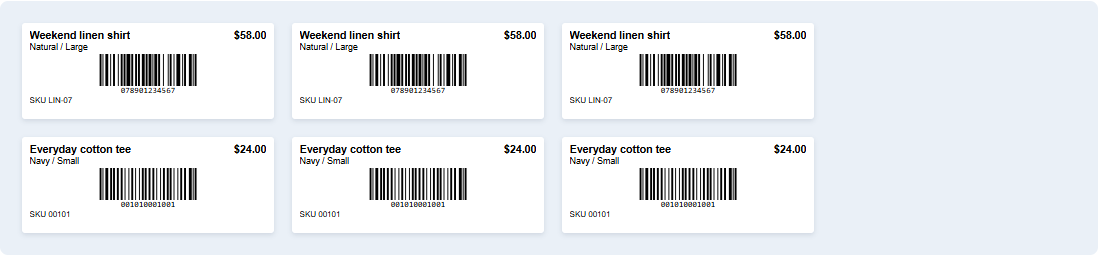
What is in the sample?
The batch follows this receiving list. Leading zeros in SKUs are preserved; each quantity becomes that many labels.
| SKU | Product / variant | Received |
|---|---|---|
LIN-07 | Weekend linen shirt · Natural / Large | 3 |
00101 | Everyday cotton tee · Navy / Small | 4 |
CAN-04 | Canvas market tote · Forest green | 2 |
00102 | Everyday cotton tee · Navy / Medium | 2 |
SOCK-02 | Everyday crew socks · Heather / One size | 1 |
Sample data only. These barcode values are fictional. Do not use the sample labels on real stock.
Start with plain paper.
Print the sample on Letter paper in portrait orientation at 100% / actual size. Turn browser headers and footers off; disable fit-to-page scaling. Compare the result with your label sheet before using label stock.
Digital checks have been completed. Physical printer alignment and scanner/POS compatibility have not been verified. Test your own equipment before a real batch.
Check the fit for your shop.
A fit when you have
- A product catalog and received quantities in comma-delimited UTF-8 CSV files.
- Existing barcode values, unique SKUs and a title for every variant.
- A desktop browser, Letter 30-label sheets and a scanner/POS that accepts Code128.
Outside this version
- Thermal printers, A4 sheets, other layouts or direct XLSX import.
- A native Shopify app, store connection or automatic inventory updates.
- Creating new barcode identifiers or producing UPC/EAN symbols.
The full offline utility
Use your own delivery files.
US$19, one-time. The full download matches your two CSVs by exact SKU, flags blocking issues and prints existing values as Code128, with up to 500 labels per batch. Your files are processed on your device. This free sample is a fixed PDF; using your own CSVs requires the paid utility.
Enter quantities actually received. For partial deliveries, make a new batch for each arrival. The utility does not remember previously printed quantities or track the outstanding order.
Join the discussion
You must be logged in to post a comment.